

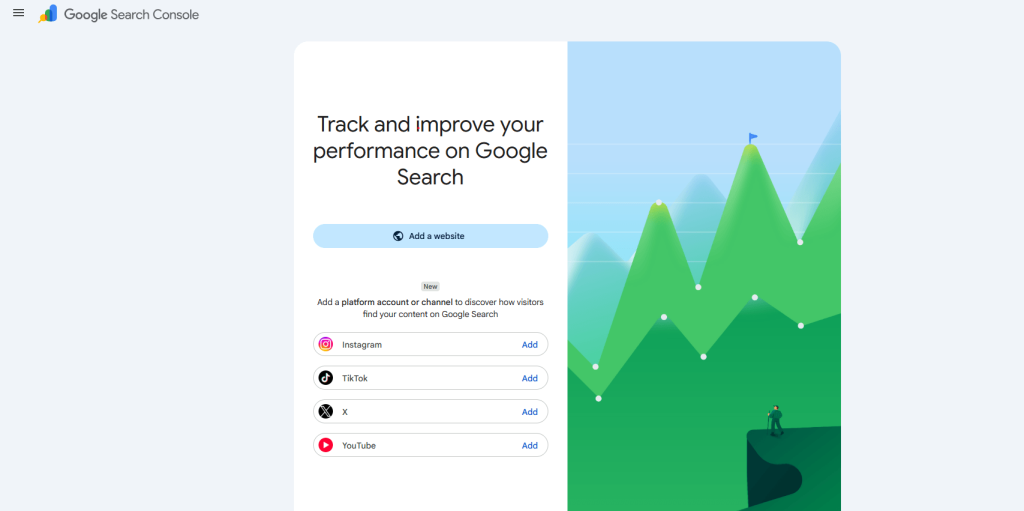
Google Search Console (GSC) has evolved beyond website tracking. In 2026, Google introduced Platform Properties, enabling creators, brands, and businesses to monitor how their Instagram, YouTube, TikTok, and X (formerly Twitter) content performs in Google Search.
If your business invests in social media marketing, this new feature provides valuable SEO insights that were previously unavailable.
What Are Platform Properties in Google Search Console?
Google Search Console (GSC) has traditionally helped website owners monitor how their websites perform in Google Search. However, with the growing influence of social media content in search results, Google introduced Platform Properties, allowing creators and businesses to monitor the search performance of their social media accounts directly within Search Console.
Instead of tracking webpages, Platform Properties enable you to analyze how your Instagram posts, YouTube videos, TikTok content, and X (formerly Twitter) profiles appear in Google Search.
This feature bridges the gap between traditional SEO and social media optimization, providing valuable insights into how users discover your content outside of the social platforms themselves.
Why Google Introduced Platform Properties
The way people search online has changed significantly over the past few years.
Instead of searching only for websites, users now frequently search for:
- Instagram creators
- YouTube tutorials
- TikTok recipes
- Product reviews
- Brand profiles
- Educational videos
- Local influencers
Google increasingly surfaces this content directly in search results.
To help creators and marketers understand this growing search visibility, Google introduced Platform Properties.
Now, businesses can measure how their social content performs in Google Search without relying solely on each platform’s native analytics.
Benefits of Platform Properties in Google Search Console
Setting up Platform Properties offers several advantages for creators, businesses, and digital marketers.
Monitor Search Visibility
Track how often your social media content appears in Google Search results.
Understand User Search Behavior
Discover the exact keywords people use before finding your content.
Improve Content Strategy
Identify which videos, posts, or reels generate the highest search traffic.
Measure Organic Growth
Analyze clicks, impressions, click-through rate (CTR), and average position from Google Search.
Centralize Performance Data
Manage website SEO and social media search performance from a single Google Search Console account.
Supported Social Media Platforms
At launch, Google Search Console supports Platform Properties for the following platforms:
| Platform | Supported |
|---|---|
| YouTube | ✅ |
| ✅ | |
| TikTok | ✅ |
| X (Twitter) | ✅ |
Google may add support for more creator platforms in future updates.
Prerequisites Before Setting Up Platform Properties
Before you begin, ensure you have the following:
- A Google Search Console account
- Ownership or administrator access to your social media account
- Active login credentials for the platform you want to connect
- Permission to authorize Google Search Console
Unlike Domain Properties, you do not need DNS verification, HTML tags, or website ownership verification.
How to Set Up Platform Properties in Google Search Console (Step-by-Step)
Step 1: Sign in to Google Search Console
Open your Google Search Console account using the Google account associated with your business or creator profile.
If you already manage multiple properties, click the Property Selector in the top-left corner.
Then select: ➜ Add Property

You will notice the option to add a new Platform Property if it is available for your account.
Step 2: Choose Your Social Media Platform
Select the platform you want to connect.

Available options include:
- YouTube
- TikTok
- X (Twitter)
Each social account is treated as a separate property.
For example:
- Brand Instagram
- Company YouTube Channel
- Personal Creator Account
Each requires its own setup.
Step 3: Verify Ownership

Google needs to confirm that you own the social media account.
Verification is much simpler than website verification.
Typically, you’ll need to:
- Sign in to the selected platform
- Approve Google’s authorization request
- Grant Search Console permission to access search performance data
The process usually takes less than a minute.
Step 4: Complete the Connection
Once authorization is complete, Google automatically verifies ownership.
Your Platform Property will immediately appear inside your Search Console dashboard.
No manual verification files or DNS changes are required.
Step 5: Wait for Data Collection
After setup, Google begins collecting search performance data.
If your account is new, don’t worry if reports are initially empty.
Google typically requires a few days before displaying meaningful data.
As search impressions accumulate, your reports will populate automatically.
Understanding the Available Reports
Once data becomes available, you’ll gain access to several valuable reports.
Performance Report
This report shows:
- Total Clicks
- Total Impressions
- Average CTR
- Average Position
- Search Queries
- Top Performing Posts
- Individual URLs
This is the primary report for measuring organic search visibility.
Search Queries
One of the most valuable reports shows the exact search terms users entered before finding your content.
Examples include:
- Best productivity apps
- Instagram marketing tips
- Wedding photography ideas
- Healthy breakfast recipes
These insights help you create future content around proven search demand.
Top Performing Content
Identify which videos, reels, shorts, or posts generate the most Google Search traffic.
This allows you to:
- Create similar content
- Update successful posts
- Improve internal content planning
Search Appearance
Depending on the platform, you may also see different search appearance filters that indicate how your content was displayed within Google Search.
Platform Properties vs Domain Properties
Many users confuse these two property types.
Here’s a simple comparison:
| Feature | Domain Property | Platform Property |
|---|---|---|
| Tracks Websites | ✅ | ❌ |
| Tracks Social Accounts | ❌ | ✅ |
| DNS Verification | Required | Not Required |
| Measures Website SEO | ✅ | ❌ |
| Measures Social Search Visibility | ❌ | ✅ |
| Includes Clicks & Impressions | ✅ | ✅ |
For most businesses, using both property types provides the most comprehensive view of your online presence.
Frequently Asked Questions
Are Platform Properties free?
Yes. Google Search Console remains completely free, including Platform Properties.
Can I connect multiple Instagram accounts?
Yes. Each Instagram account must be added separately.
Does this replace Instagram Insights or YouTube Studio?
No. Platform Properties only report traffic from Google Search. Native analytics remain essential for engagement metrics like views, watch time, likes, and follower growth.
Can I connect personal creator accounts?
Yes, provided they are supported by Google Search Console and you can verify ownership.
Will Platform Properties improve my rankings?
No. Simply adding a Platform Property does not influence rankings. It helps you measure search performance and identify optimization opportunities.
Final Thoughts
Platform Properties represent an important evolution in Google Search Console, reflecting the growing role of creator content and social media in search. By connecting your supported social accounts, you can gain valuable insights into how users discover your content through Google Search, identify high-performing topics, and align your social media strategy with SEO best practices.
For businesses, marketers, and creators, combining Domain Properties for websites with Platform Properties for social accounts provides a more complete picture of your online visibility. As Google continues to expand search experiences beyond traditional web pages, leveraging these insights can help you make smarter content decisions, improve discoverability, and strengthen your overall digital presence.